
Documentation

bbPress Notify (No-Spam) BuddyPress Bridge Documentation
bbPress Notify (No-Spam) BuddyPress Bridge Documentation The BuddyPress Bridge is a premium add-on for bbPress Notify (No-Spam) – bbpnns – that lets you integrate bbpnns


Update: v2.0 is now available, allowing the use of multiple shipping vendors at the same time.
Replace eShop’s default shipping methods with live calls to Canada Post, Correios*, UPS*, and USPS*.
* See Extension Modules below.
eShop Shipping Extension framework overrides eShop’s default shipping methods, interacting directly with Canada Post for real-time shipping rates and services.
Other services such as Fedex, and DHL will be made available soon.
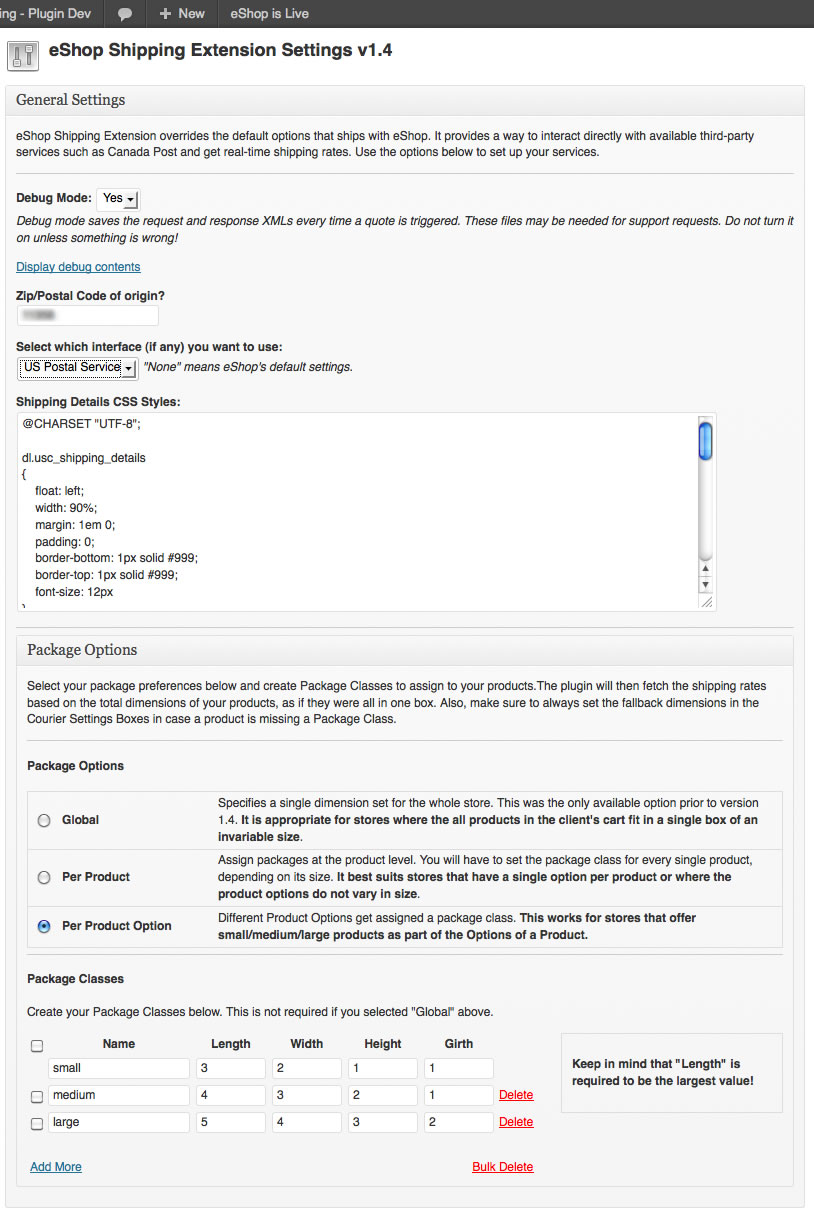
1. A few easy settings get you up and running in minutes.
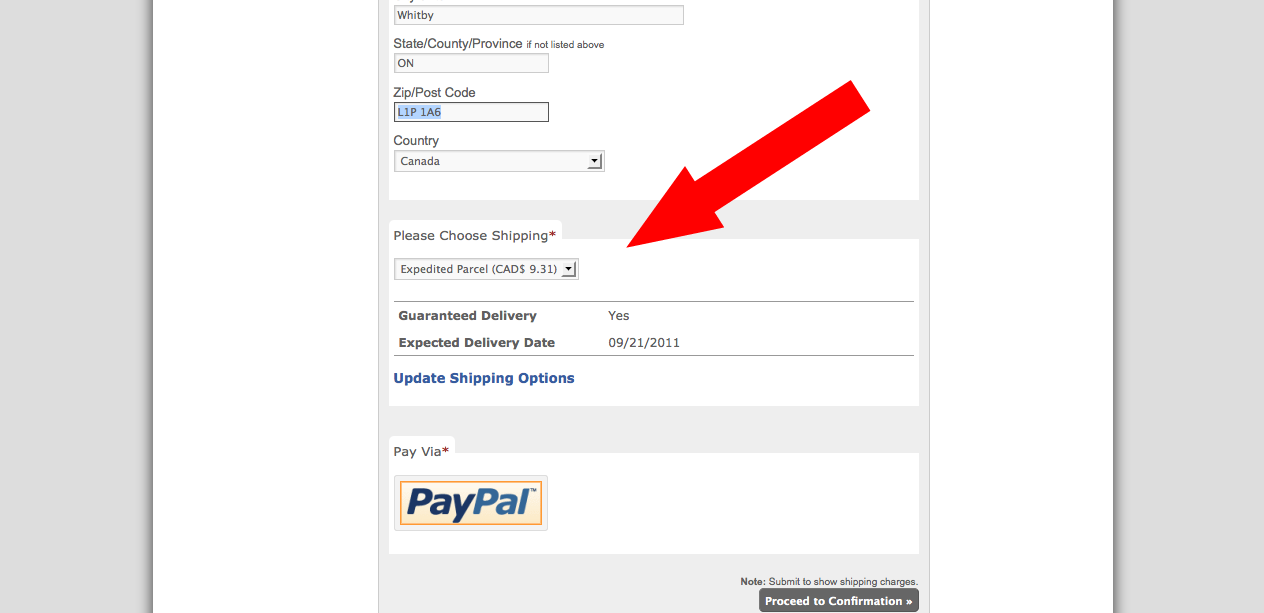
2. The shipping options is moved to the bottom of the order form and will display Service Name, Price, and a couple of service descriptions received from Canada Post API.
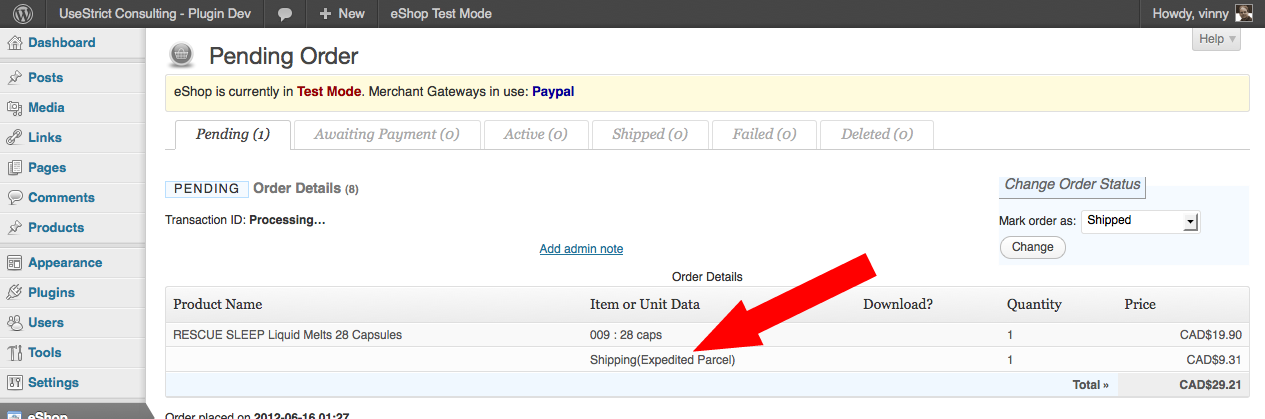
3. The shipping mode selected is displayed next to the Shipping item in the order form, so you know what kind of service your client selected.
You can get the file here (from wordpress.org): eshop-shipping-extension.zip
The interface to Canada Post comes bundled with the framework. If you’re looking for UPS, USPS, or Correios (Brazil) you can find them by following the links below.
bbPress Notify (No-Spam) BuddyPress Bridge Documentation The BuddyPress Bridge is a premium add-on for bbPress Notify (No-Spam) – bbpnns – that lets you integrate bbpnns

bbPress Notify (No-Spam) Documentation The bbPress Notify (No-Spam) is a free plugin that lets you control who gets notifications of new Topics and Replies in
87 Responses
Hi Vinny: I’ve just installed this in WordPress and I’m getting an error:
“/rs/ship/price: cvc-simple-type 1: element {http://www.canadapost.ca/ws/ship/rate}weight value ‘550’ is not a valid instance of the element type”
This happens when I click ‘update shipping options’ in the shipping section of the checkout page. I have my weights set in eShop in grams and the calculated total of the two items I’m testing the plugin out with is 550 grams, so I’m assuming the weight value is not being recognized by Canada Post. Any thoughts on how to fix this?
Thanks!
Hi Andrew,
Canada Post expects kilos, and I put in a pound to kilo converter, but not a grams to kilo. I’ll put in a converter later today. What abbreviation are you using for grams? Just “g”? Please let me know so I can make sure I have every possible combination for “grams”.
Cheers,
Vinny
Thanks for the speedy reply! I was using ‘g’ but I can always just enter the product weights in kg – 0.2 works just fine, for example. Does eShop actually send the weight abbreviation when it connects to Canada Post?
eShop Shipping Extension does not send the abbreviation. Canada Post just expects the number to be in kg, and there’s a maximum weight limit which is well below 500 kg :).
Yes, I thought 550kg might be excessive! Using kg with decimals works now, but I have a few bugs.
1. If the postal code is entered in lower case, there’s an error “rs/ship/price: cvc-simple-type 1: element {http://www.canadapost.ca/ws/ship/rate}postal-code value ‘v6t1z3’ is not a valid instance of type {http://www.canadapost.ca/ws/ship/rate}PostalCodeType”
2. I’m getting one shipping option ‘expedited parcel’ only. Is this correct?
3. I am getting the same price quoted and same delivery date no matter what postal code I put in – $9.31 and today’s date. This is the same with all postal codes and international addresses.
Re 1.: Good catch. Canada Post is turning out to be quite the picky system 🙂
Re 2 and 3: You’re running in test mode. Canada Post only returns those values when using their test API. I put in a Notice about that in the admin interface.
I’ll add a fix for #1 later today. Do let me know if you find anything else.
Thanks for your help with this. Got the update and it fixes the lower case issue. Tried it in regular mode, and it worked just fine. Excellent add-on, indeed. Thanks for creating it!
I’m glad it’s as useful to you as it is to me – I just wasn’t satisfied with eShop’s default shipping options. Feel free to rate the plugin over at eShop Shipping Extension
Cheers,
Vinny
Hello,
I am having the error below and I am afraid is related to weight as well. I set the maximum box size of my products and added 0.2 as the number for weight on my test product. Once I choose proceed to confirmation, the shipping is doubled even if I change my box size to smaller and I am shipping within the same city as the destination.
Ignoring the total shipping charges, then I proceed to checkout and this is what I get:
Checkout
Fatal error: Cannot use string offset as an array in …. wp-content/plugins/eshop-shipping-extension/eshop-shipping-extension.php on line 529
I am running eshop in test mode
Also, where can I update the list of provinces/states by country? Since this module is for Canada Post, it will be convenient to have all Canadian provinces selected.
Thank you,
mgab
Hi mgab,
Last night I released version 1.2.1 of the plugin which provides debugging options. Please turn it on and run a request. It will store the Request and Response XMLs which I need to help you. Feel free to delete the CustomerNumber from the Request XML (I’ll add automatic deletion of the CN in version 1.2.2, as well as compensation for the 3% automation discount that the API provides). You can use the Contact Form to send me the data.
Regarding the list of provinces/states by country, I’m not sure I understand your question. If you are referring to the checkout form, I too have had trouble getting the Provinces/States drop-down to show the correct values. Note, however, that it is an eShop configuration issue, and not related to this plugin (although I do think about improving that part as well).
Cheers,
Vinny
Thank you for your prompt reply, I will update the plugin and will pass the information back to you.
mgab
mgab,
I just figured out that the list of State/Provinces in the checkout form is set under eShop->Shipping->XX State/Country/Province, where XX is the currently selected country code.
In that pane, on the side column (under “Set State/County/Province”), select “Canada” and it will show by default in the State/Province dropdown in the checkout form.
As mentioned before, this is an eShop setting, and not an eShop Shipping Extension setting. I do plan to have eSE offer ajax reload of the State/Provinces when the client changes the country in a later version (perhaps 1.3).
Cheers,
Vinny
My oversight, when I kept getting the error at checkout I uninstalled eshop and forgot to select Canada from the list again. Thank you. BTW I have sent you the debug data, did a live test.
Thanks,
mgab
mgab,
I sent you instructions on how to fetch the information I need to figure out the problem. You also forgot to tell me which version of eSE you’re using. From the line number where you say the error is (543), it looks like you’re using 1.2.4. This problem was fixed in 1.2.5.
Vinny
Vinny,
I Just installed the latest version and the problem has been solved. Sorry, I missed the last update. Thank you very much for the help.
Hi there. I’ve recently installed this plugin and have also created an account with canada post where they gave me a development and production API. I took those and placed them in the test and live username/password. I then went to my e-store setup and when I click shipping options, it simply takes me to the top of the checkout page which i’m already on. I’m not overly experience so there may be something simple I’m missing. Hopefully this isn’t too vague to give you any ideas as to what the solution may be to start getting the shipping to work correct. Thanks for your time!
Jon
Hi Jon,
It sounds like you’re getting a javascript error of some kind. Please install Firebug in Firefox (in case you don’t already have it) and post the error message you’re getting.
Cheers,
Vinny
Thanks for the quick reply, Vinny. I installed firebug in firefox and ran it while I attempted selecting the “view shipping options” on the checkout screen. I’ve never used these programs before but all I could find on the error messages when i selected “all” in firebug was:
“Reload to activate window console”
“enabling javascript debugger to support console”
“enabling javascript debugger to support JavaScriptTool”
I’m hoping i’m using this program correctly lol.
Jon,
Under the console/all pane, you should be able to see an error when you click shipping options and get taken to the top of the window. That’s the info I need. If it asks you to reload, just reload the page with Firebug open and try clicking the link again.
ah my mistake. When I load that page I get this:
“NetworkError: 404 Not Found – http://www.take5.ca/wp-content/uploads/eshop_files/eshop-cart.js?ver=3.4.1”
eshop-…r=3.4.1
F is undefined
[Break On This Error]
…or+G;o(document).bind(i(G,this.selector),this.selector,E);return this},die:funct…
I’m assuming by F it’s talking about my shipping option as they all have F listed beside them in the product list in eShop.
The problem is not with eShop Shipping Extension, but with your installation of eshop plugin. I don’t know if deactivating/deleting/reinstalling eshop would fix it. You could probably copy the missing file (eshop-cart.js) into the correct directory (wp-content/uploads/eshop_files), but if that one is missing, others might be as well. Note that if you are going to deactivate/delete/reinstall eshop, you might lose any eshop data you have already set up. Be sure to back it up!
Ah ok. Well thank you very much Vinny, you’ve been more than helpful 🙂 I’ll go ahead and proceed to re-install eShop. Fortunately i’ve done very little with it so far.
Best regards,
Jon
Hello again Vinny, sorry to clutter your page with my comments :S I just thought i’d follow up by saying that I reinstalled both the eshop and the eshop shipping extension and no longer get that error showing up on firebug. The same problem is occurring now tho that when i click select shipping options it just takes me back to the top of the same page i’m on. Do you still think the root of this problem is a result of the eShop plugin? If so I’ll try finding someone to follow up with from them, I’m just uncertain where to start to get the problem resolved.
Thanks again,
Jon
eSE v1.3.1 contains the fix for jQuery < v1.7.
Hi Vinny,
I am using eShop Version 6.2.1 with the eShop Shipping Extension v1.4.1 and like others here I encountered some problems while attempting to configure it, first it will not let me save the preferences without this warning “Canada Post: Test Password does not contain a valid string” whenever I have a special character in either the test or the live password (however that part seems to work anyway).
The more important aspect is that whenever I try to save a product after enabling the plugin and setting package sizes, etc. eShop removes the check mark from the “Stock Available” and tells me that “Stock Available not set, as all details were not filled in.” (even tho they were before)
If I disable the plugin I can proceed to add products to stock and checkout normally (eShop is still in test mode).
Thanks,
Dava
My bad, I am now able to save products with the stock available and place orders (I disabled the plugin and re-enabled it, somehow it worked out this time)… however…
When I try to place an order I do not get anything under Please Select Shipping, there is a spinning harrow beside “Update Shipping Options” … but no apparent result.
Dava,
Please enable firebug and send me any Javascript errors you’re getting when clicking “Select Shipping”.
Thanks,
Vinny
The problem was likely due to SimpleXMLElement on PHP < 5.3. It's been fixed in version 1.4.4.
eShop Shipping Extension Version 1.4.4 came out with a fix for folks using PHP < 5.3. The symptom was exactly what you were seeing. Check your PHP version to make sure this was your case.
Hi Vinny!
I am having the same problem. When I click Update Shipping Options nothing happens.
Firebug says: “TypeError: data is null
[Detener en este error]
if(data.success === false) {”
on eshop-shipping-extension/includes/eshop_shipping_extension.js?ver=2.0.3 on line 205.
My PHP version is 5.2.14 so I guess is the SimpleXMLElement you mention in previous comments.
Other info:
eShop Shipping version: 2.0.3
UPS and USPS module version 2.0
eShop version: 6.2.17
Hi Diego,
Without looking at the actual error being returned by the Ajax request, it’s hard to pinpoint the issue. Please check the HTML tab in Firebug after the ajax call has been made, and also your server’s error logs. However, I just found a bug and am releasing the fix with version 2.0.4. The error message raised by that bug is “PHP Fatal error: Unsupported operand types in /path/to/wp-content/plugins/eshop-shipping-extension/eshop-shipping-extension.php on line 260”.
Please update to 2.0.4 before doing any more debugging.
Cheers,
Vinny
Hi Dava,
I assume you were referring to eSE v1.4 (as 1.4.1 did not exist when you wrote the comment). Regarding the problems you are seeing:
Update: v1.4.1 is out with the fix.
Cheers,
Vinny
Hi!
I’m getting an error at the checkout. I just updated to version 2.0.6 of the eShop Shipping Extension and I have the latest version of eShop.
I’m getting this error:
Failed loading XML ; Opening and ending tag mismatch: META line 1 and HEAD ; Opening and ending tag mismatch ; HEAD line 1 and root ; Premature end of data in tag root line 1
What does this mean?
Thank you!
Hi Clare,
Please send the request and response XMLs as attachments to vinny [at] usestrict [dot] net so I can have a closer look.Update: I knew that error was familiar… Canada Post Webservices went offline for maintenance last night. Here’s the email they sent:
Everything is back to normal now.
Thanks,
Vinny
Ah! I didn’t get that email, maybe because I had just signed up. Thanks!!
Hi again Vinny,
Sorry to bother you again. I activated the plugin and it when I fill out the fields on the checkout page, I get a “AAA Authentication Failure”. Does this mean that I’ve entered my username/password for Canada Post’s Developer program wrong in the settings (I log in with it with no problems), or does it mean something else entirely?
Thank you! 🙂
Hi Clare,
It’s no bother at all… I believe you are using the wrong credentials.
Go to http://www.canadapost.ca/WebServices and either register or Log In. Once you’ve logged in, the first thing you’ll see is a big table with your API Keys for Development and Production. Those are the keys you need to set in the eShop Shipping Extension Admin.
Cheers,
Vinny
Hey Vinny,
Thanks for helping me out! It works now.
Now I’ve got another question.
When I was using eShop’s default shipping, I went to Canada Post and I had to figure out approximate shipping costs within Canada, to the States, and abroad. Within Canada, they told me, shipping is like, approximately $3 flat fee (+$1.89 for the packaging I bought–a 8.5 by 11 Bubble Mailer). That meant, $5 shipping to anyone in Canada, by regular mail. It fits through the regular mail slot. But I don’t see this option on the checkout page: the cheapest is the $15.07 Regular Parcel. Is it because they are business and/or online prices? I don’t suppose there’s anyway to to add this. Bummer.
Hi Clare,
Make sure you have the right size package set up. If you have a too big a package being sent to Canada Post API, you’ll have to pay for the volumetric weight as opposed to the actual weight. To assist in getting the right size package, I created the Package Class interface. When the API call is made, the system calculates the sizes of the products and simulates as if they were all neatly packed in a single box to get the quotes.
Business quotes are cheaper, so you’ll probably want to set it up to get counter quotes – the user will pay approximately 5% more than business quotes, which will help you in case of discrepancies when shipping your product.
Vinny
Oh okay, thanks Vinny 🙂
Oh, PS, it was the weight of my product that made it $5, but it was still in a 8.5 by 11 Bubble Wrap package. But anyway, it was an option that wasn’t parcel shipping, that was very cheap, and also regular mail.
Hey again Vinny,
Sorry to keep hounding you with this. I guess this is what you mean for volumetric weight vs actual weight and how to calculate it:
http://www.canadapost.ca/tools/pg/manual/PGabcmail_web_business-e.asp#1378832
My products are all 13.97 cm x 21.59 cm and about 2.5 cm or less in height. I changed the packaging sizes in the back end to reflect this, and still, no change, cheapest price is parcel @ $15.07. Then, when I calculated my volumetric weight, I always seemed to get my actual weight or less. (13.97 x 21.59 x 2.5 / 6000 cubic centimetres = 0.125). One product is 0.12 kg and the other is 0.22 kg. So presumably they’re still charging by my actual weight?
I still feel this is a Canada Post packaging assignment issue–like they don’t offer this specific regular mail packaging online or something. Even when I click “Find a Rate” and enter these dimensions, I get prices similar to that one, but not the cheap, $5 or less, Bubble Mailer 8.5 by 11 inch Envelope. Parcel does not equal envelope, maybe? This is the envelope I’m using (pack of 5): http://www.canadapost.ca/shop/mailing-shipping-supplies/envelopes/cushion/p-242707.jsf?execution=e1s1
Clare,
Please send me an email (vinny [at] usestrict [dot] net) with the request and response XMLs attached so I can investigate.
Vinny
Greetings – I’m having trouble with the ‘Please Choose Shipping’ element on the form. Once I have selected products and entered the address, the arrows just keep cycling and I don’t get to see the shipping options. I have selected the countries in the settings and I have selected ‘Live.’
Curiously it was working fine until I updated the plugin to 2.0.7 (I think it was 1.9 that was installed initially)
The store is loccated at http://www.fabinbc.com/online-store/size-35-mega-hooks/
Thank you for the excellent work and be sure to expect a reward once the system has been proven!
Hi David,
Sorry for the delay in answering – your comment was flagged as spam so I didn’t see it until now.
I tested your site, and this is what I’m getting:
It’s an issue when trying to convert the currency from USD into GBP – please check that your php.ini has allow_url_fopen turned on. You can see what the value is by creating a page – NOT USING WORDPRESS – (e.g info.php) with the following content: <?php phpinfo(); ?>
Make sure you delete it after you’re done with it as it can be a security breach.
Cheers,
Vinny
Thank you for your fast response Vinny, even though I did end up as junk!
I have followed your instructions and the returned page does show allow_url_fopen as being on.
Curiously, I tried the store again this morning and the shipping options were showing. I then tried to edit the cart and the Update Shipping Options and it hasn’t worked since then. I have cleared browsing history etc. and it doesn’t work. I have tried a different computer and tried it with IE and Firefox, without success.
Do you think it makes any difference that the Online Store is on a sub-blog? The main info blog as at fabinbc.com and then a second wp blog is loaded at fabinbc.com/online-store so that I keep it cleaner and faster than the main site.
Do you have any other suggestions?
I found the problem. When you’re typing in the address fields for the first time, there seems to be a bug where the form triggers 3 calls to get the rates. Google then blocks those calls with a 503 error because it’s just hitting them too many times.
I’ll put in a fix later today to control the number of hits.
Thanks for bringing it up!
Vinny
You’re amazing! I will update the plugin when it’s completed.
Thank you
David, it’s fixed in version 2.0.9.
Cheers,
Vinny
HI Vinny – That fixed it. I’ve made several test runs using different options and the shipping options load instantly every time. Once I’ve transferred to the new store, the first payment is for you.
Another question though – When I place an order for two different sized products, the shipping is calculated as a sum of the two, as though it were two separate orders. If I place an order for two size 50, 36″ hooks and two size 20, 22″ hooks, it will calculate the cost of shipping for each size and add them, when in reality it costs only as much as the largest item, to send them all.
Is there a way to make the shipping only apply to the highest value item or the largest item only? Alternatively, fixing the shipping cost as the largest package used and then adding $1.50 for each additional item on the order would work.
The cost of shipping is going to put people off when they order multiple size knitting hooks, which is common in our store.
David,
What you describe above is the way the system used to work before I put in the Package Class options. With Package Classes, you can set the correct size for each product and the system will calculate the final size of the package. Basically, if one package fits inside the other, the call to the carrier should contain the largest of the packages (normalized to be as cubic as possible).
It’s not a plain sum – it’s a pretty complex algorithm. Please make sure you’re using Package Classes and that your products have the correct package class assigned. Make a sample call and email me the XML request and response files to vinny [at] usestrict [dot] net so I can have a look.
Thanks,
Vinny
I am using package classes, with four different sized packages. I have also included the largest size parcel in the ‘packaging options’ section at the bottom of the page.
As for ‘making a call to retrieve an XML request’ I think I am out of my depth there. How do I do that? I use Serif WebPlus x6 to create all of my websites, so I don’t tend to get involved with much of the knitty gritty.
Thank you again
Turn on debugging in Settings -> eShop Shipping Extension; Go to your checkout page (with something in your cart, of course), fill in the form and click “View Shipping Options”. That will populate the XML request back at the Settings -> eShop Shipping Extension screen. Just refresh it and click on “Display debug contents”.
Also, remember that just setting package classes makes them available for your products. If you don’t set the correct package in the Product Entry form, it does you no good.
Hi Vinny – I’ve sent you an email with the information
Hi David,
As mentioned by email, I found and squished the bug. The fix was released with eSE v2.0.11.
Cheers,
Vinny
Canada Post released a new API around the beginning of September. Does your plugin address that?
Hi Sarah,
If you are referring to Merchant credentials, no, we are not yet registered as merchants to be able to use that feature. Each user must register at Canada Post and use their own credentials.
Vinny
Um, not sure. As of early Sept 2012, Canada Post has a new method for integration–they updated their shipping rate lookup service. I think it has something to do with dropping Retail IDs and using a production API only. Found this online: “We are no longer accepting new customers for our Sell Online services. In its place, we are pleased to introduce a complete portfolio of web services for the integration of Canada Post shipping data into your applications and processes.”.
I’m not familiar with the Sell Online services. eShop Shipping Extension plugin uses the Web services API for rates, but it’s older than September 2012. The specifications of the plugin were taken from the Canada Post Developer Program and there’s nothing there saying that they have been deprecated. You can find the overview of the specs for the Rating API here.
Vinny
Hey,
I’m getting the error
/rs/ship/price: cvc-simple-type 1: element {http://www.canadapost.ca/ws/ship/rate}weight value ‘0.090718474’ is not a valid instance of the element type
I had set the weigh value to 1
I tried different numbers, but i still get a similar error
I’m live.
It’s ok! i figured it out, the regular eshop shipping settings were set for LB
Hi Jackie,
Here are a couple of troubleshooting tips:
Looks like I replied a bit too late – it was the second bullet point after all :).
Hello….
Trying to get the shipping extension to work with Canada Post. I keep getting an Authentican Failure. I have checked my passwords with Canada Post and everything looks okay. (I did sign up for the Developer program).
http://www.omygoodnessgranola.com
Thanks to you,
Natalie
I also posted this question on wordpress.org support site, but haven’t heard back yet, so I thought I would try here.
Hi Natalie,
Sorry for the delay in replying in the wordpress.org forum. I didn’t get notified of any messages. I’m sending you an email so that you can provide more information.
Hi Vinny. Does your extension plugin allow for adding a fixed handling charge to shopping cart? With eShop I have to add extra to the weight of the product to cover handling.
Hi Lanny,
It does not at the moment, but if you explain exactly how you’d like it, I can try to add that functionality.
Vinny
That’s very nice of you. I have not yet downloaded your plugin because I’m in the U.S. so would have to buy the USPS version as that is my only shipping carrier. I would consider doing that if it allowed for what I need. I’m not a programmer so I’ll do my best to explain it. Ideally it would automatically add a single, fixed handling charge to every purchase — not to every item — that would be incorporated into the final shipping charge. The buyer would simply see a total shipping charge without seeing exactly how it was broken down into shipping and handling. I am currently using eShop Method 4 calculating shipping by weight and zone and adding extra weight to the actual shipping weight of the product to account for handling. Someone else asked about this function on the eShop forum and was told it didn’t exist. Thanks, Lanny
Hi Lanny,
This part complicates things: “The buyer would simply see a total shipping charge without seeing exactly how it was broken down into shipping and handling.”
When the client clicks to view shipping charges, he is presented with the service and the price. So there would be no way to actually hide the handling price, as the client would know how much the shipping price was.
Would there be a problem to explicitly show handling?
Silly me, I can always add the handling value to the price that shows for each shipping item in the drop-down. How does that sound?
That sounds great except that I want to add one handling charge per order, not per item. It’s okay, too, if the buyer sees the handling charge as a separate charge. My preference, though, would be to have it rolled into one final shipping charge. I think other people (like the person who posted in the eShop Wiki forum) would appreciate being able to do that, too. I have to go to a meeting now. Will check back here later or tomorrow morning. Thanks!
Hi again. Is this function still a possibility, assuming that the handling price would be shown as you described a couple of posts ago?
Hi Lanny,
Yes, it is. However, I’m swamped with work and I’ll only be able to look into it when I get a breather – probably over the weekend. Please subscribe to my newsletter for the eSE Handling Module (it’s already got a name :)) at http://usestrict.net/newsletter-subscription to be informed when it gets released.
Vinny
Hi Lanny,
I’ve released the Handling plugin. You can find it here
Cool! I subscribed. Now maybe you can answer another shipping question (when you get time). The products we sell include books which we would like to be able to offer our customers the Media Mail rate Almost all of them weigh more than our other products and the Media Mail settings kick in at the lowest book weight. There is no way to specify in eShop that this rate would apply only to books. We are including a note via a “text to add” field in the eShop settings that alerts the buyer that the Media rate applies only to books but the choice still comes up for them anytime they reach that weight. Is there any way to have the Media Mail rate come up only for books?
I could probably put in the Media Mail rate constraints, but for that to work I’d have to know if the products in the cart are books or not. And if it’s mixed, then I’d either have to set up multiple shipments at different rates, or disavow Media Mail altogether.
do we have an update for the increased USPS rates?
The software makes an API call to USPS and simply displays the rates that it receives. No change is required to the USPS module to get the new rates.
Do I have to be using a eshop shopping cart to use your plugin or can I use it with woocommerce?
Hi Maja,
You need to use eShop for WordPress in order to use my eshop extension plugins. I have plans of extending the shipping to other platforms, but it won’t happen any time soon.
Vinny
Hi Vinny!
I’m having a “Failed loading XML” when I try in test mode to show the shipping options for CanadaPost in the checkout form… API keys are all entered properly… My site is still in test mode if you wanna test… http://lm106.electronicbox.net/?page_id=2
Hi,
I just checked out the link and could not find any products to add to the cart. It also looks like eShop is disabled as I could see unrendered shortcodes. Please make sure eShop is on, turn on debugging under Settings -> eShop Shipping Extension, try again, and send me the request XML at vinny [at] usestrict [dot] net. Also, please send me a screenshot of your eSE admin screen (print it as PDF or use screengrab or similar to get the whole page).
Cheers,
Vinny
Hi
Great plugin! I am using it for a site I am working on. I have 2 questions.
Is there a way to limit the methods offered – basically my friend wants only to offer the cheapest method for Shipping. like Small Packet – USA and International – Air and Regular Parcel
any way to do this?
and how would i go about having a few products shipped free? Like if they are 0 weight?
Thanks 🙂
Miz C
Hi Miz,
Just found your post (it was flagged as spam). As I replied in the email (repeating the reply here in case anyone is wondering the same thing), right now there is no way to limit the options displayed for Canada Post. I’ll work on a different version to get that up and running.
As for having some products shipped free, if you feel comfortable writing plugins, you can hook to a filter in wordpress responsible for free shipping and have it do whatever logic you prefer. If you’re not comfortable with coding on your own, I can do it for you for a fee (gotta pay for coffee, right? 🙂 ).
Cheers,
Vinny
Hi, Does the USPS plugin calculate Regional Rate Boxes?
Hi,
I’m not sure how flexible it is, as I haven’t had the chance to fully test it. You can get Regional Rate Box A, B, or C by whitelisting Priority Commercial or Priority HFP Commercial.
Give it a try. If it doesn’t work, I’ll give you a refund.
Cheers,
Vinny