
Documentation

bbPress Notify (No-Spam) BuddyPress Bridge Documentation
bbPress Notify (No-Spam) BuddyPress Bridge Documentation The BuddyPress Bridge is a premium add-on for bbPress Notify (No-Spam) – bbpnns – that lets you integrate bbpnns

Are you frustrated that your eShop doesn’t support your Custom Post Types?
This eShop extension adds support for Custom Post Types. It allows an admin to select exactly which Post types eShop must handle – adding custom types and/or removing default ones (page, and post).
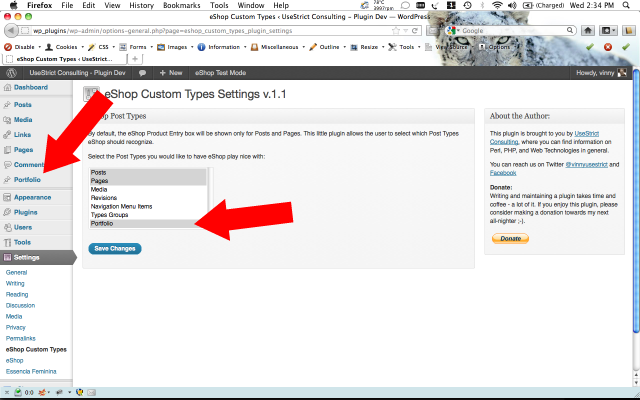
1. Using as example a Post Type called Portfolio (it can be whatever type you have created), we see it listed in the select box along with all other WordPress post types. Select the desired custom or default types for eShop to support and save the changes.
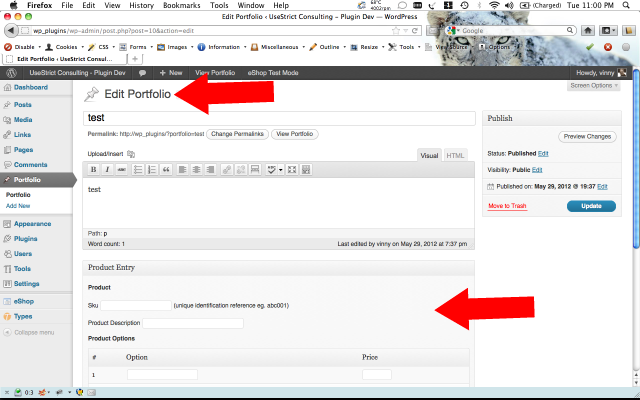
2. Edit or create a Custom Type article and see that the eShop Product Entry pane is now showing.
You can get the file here: custom-post-types.zip (v.1.1.1)
(md5sum: ebdcf61314894d0f39d6a679f3887f13)
Post a comment below with your questions and I’ll help however I can.
bbPress Notify (No-Spam) BuddyPress Bridge Documentation The BuddyPress Bridge is a premium add-on for bbPress Notify (No-Spam) – bbpnns – that lets you integrate bbpnns

bbPress Notify (No-Spam) Documentation The bbPress Notify (No-Spam) is a free plugin that lets you control who gets notifications of new Topics and Replies in
7 Responses
Hi – great plugin. I’m now looking for a way to refine the choice of where the eshop details appear. At the moment we have a choice of posts, pages, cpt’s etc.
Is there any way we can adapt the code so that eshop product options only appear in posts with a certain category? I’m already using a bit of code that forces the user to choose a category BEFORE the post is created. Ideally, if they choose the “product” category then eshop listing details will appear, but not for normal posts etc???
Thanks
You should try asking Esmi and Rich at their forum on quirm.net. My plugin only sets values for the filter that they created.
Cheers,
Vinny
Thanks Vinny – Already asked Esmi but he didn’t think it was possible 🙁
Thanks anyway for what you have made possible.
Cheers
Hi and thanks for this plugin. I have set it up and selected post type Product and Product Categories (already set up and working fine) for eShops to work with. In the admin area eShops shows correctly on product type and not default post types. However, on the front end eShop add-to-cart section will not show unless Post type is also selected.
Sorry, but the site is in maintenance mode whilst I work on it.
TIA
Jill
Hi Jill,
I don’t quite understand what you mean. Please provide examples of the shortcodes that you’re using, what you expect to see, and what you’re actually seeing.
Thanks,
Vinny
Hi Vinny, Thanks for replying. My custom post type is “Products”.
When not using a custom post the add-to-cart panel (panel showing description, price, qty, add to cart button) is automatically displayed in the post. I thought it would be the same if using your plugin with a custom post, but it didn’t display.
After reading your reply I tried inserting the shortcode [eshop_addtocart id=”58″ panels=”yes” form=”yesqty” class=”addtocart” ] but the panel still does not show.
I expect to see the add to cart panel but nothing is displayed.
Hi Jill,
I reviewed my plugin and the eshop_addtocart shortcode in eShop and I don’t see why it wouldn’t be displaying as you’re passing the ID. My plugin only serves 2 purposes: 1) to show the Product form in the Admin of whatever custom post type that you choose, and to adjust the eshop_list_cat_tags shortcode to handle custom taxonomies.
If you need further help, please contact me via email at vinny [at] usestrict [dot] net with an admin account that I can use to have a look at your setup.
Cheers,
Vinny